Flashtalking (now Innovid) call tracking sends your Infinity call data into your Flashtalking account, for inclusion in their reports. This guide explains what the integration does, what you need from Flashtalking, and how to set it up in the Infinity Platform.
What is Flashtalking?
Flashtalking services the agency ad server market by facilitating the management, delivery and measuring of all forms of digital advertising across desktop, tablet and mobile. Core aspects include display (including standard ads, dynamic, rich media, video, HTML5 and mobile), social and affiliates.
Step 1 - Obtain Flashtalking criteria
Make sure that all the corresponding goals set up in Infinity are also set up in Flashtalking, so that you can send them into Flashtalking. For example, Qualified Call or Call Rating goals.
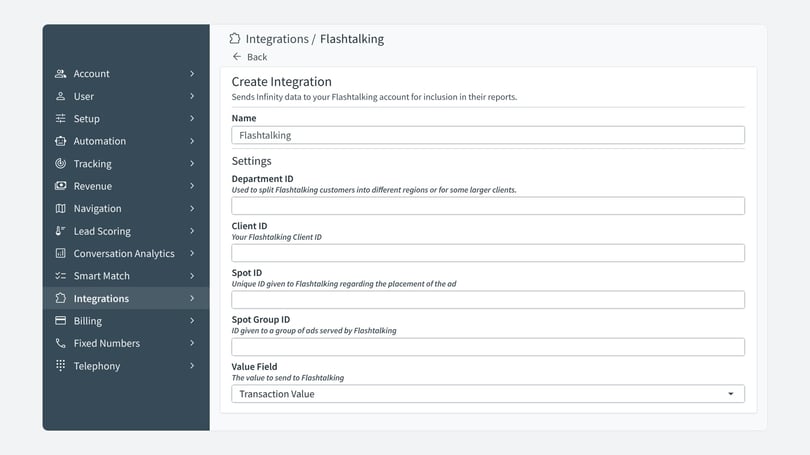
Obtain the following information from your Flashtalking Console or Dashboard, or from your Flashtalking Account Manager:
- Department ID: used to split Flashtalking customers into different regions or for some larger clients.
- Client ID: your Flashtalking Client ID.
- Spot Group ID: the ID given to a group of ads served by Flashtalking.
Step 3 - Add the integration in the Infinity Platform
- Navigate to the settings part of the Infinity Platform.
- Select Settings.
- Select Integrations > Homepage.
- Select Flashtalking from the drop-down list.
- Enter all of the fields as given by your Flashtalking representative. For example, What do you want to send?
- All fields are clickable, so you can make the criteria fully customisable, depending on what you are trying to achieve. For example, click All Calls and Add to see your options.
- Tick the box if you are happy to proceed and are aware of the cost.
- Finally, to complete the integration set up, click Save.
Step 4 - Flashtalking call tracking custom variable mappings (optional)
Once you have completed the steps above, calls begin to pass into Flashtalking. Please allow 48 hours for this process to take place. If you have concerns that you are not seeing the data in your Flashtalking account, contact support@infinity.co.
Infinity can also send other custom dimensions and metrics into Flashtalking, such as the pool name, visitor ID or any other field that Infinity captures within our tracking.
- Navigate to the Settings section of the Infinity Platform.
- Select Integrations > Homepage.
- Select your Flashtalking integration.
- Navigate to the Custom Variable Mappings section.
- Select Add Custom Dimension.
- Select an option from the drop-down list, for example Visitor ID.
- Enter the Flashtalking variable for where you would like this sent within Flashtalking.
- Select Save.
Need more help?
If you have any questions about the set-up process, contact support@infinity.co.