VWO call tracking sends your call data from the Infinity Platform into your VWO account. This guide shows you how to set up the integration, from opening the integrations page to adding a VWO account and saving your choices.
Set up VWO call tracking in Infinity
Follow these steps to configure your visual web optimizer integration.
Note: VWO have a separate product called VWO Data360. The Infinity integration is not compatible with VWO Data360.
- Log in to the Infinity Platform and navigate to Settings (bottom left).
- From the left hand navigation, select Integrations > Homepage.
- From the list of available integrations, find and click VWO.
- Select Add VWO Account.
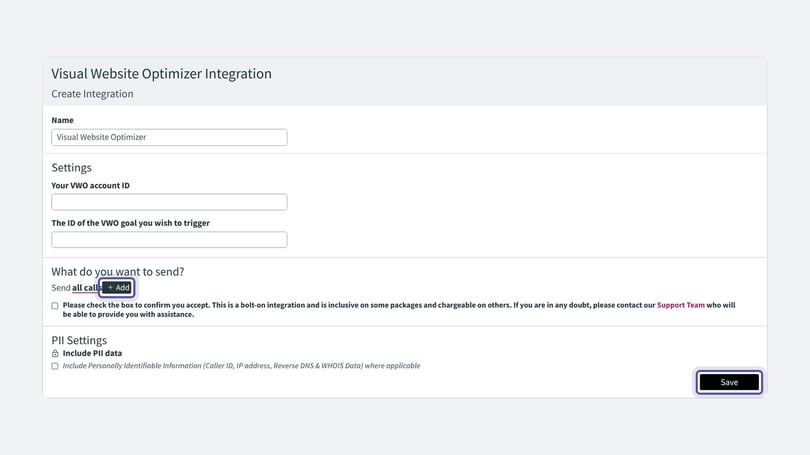
- Decide what data you would like to send into VWO. Click Add if you would like to add any additional criteria.
- Click Save to complete your integration.
Related integration guides
For related set-up, see the Google Ads integration, Facebook integration, Search Ads 360 integration, Microsoft Ads integration and Google Campaign Manager integration guides.
Need more help?
If you're still stuck, get in touch with your account team or email support@infinity.co.