Webtrends call tracking links the visitors who call your business to their Webtrends visitor journey. Infinity extracts the Webtrends ID from the cookie set by the Webtrends tracking code, and sends call and goal data to your Webtrends space. This guide covers what you need before you start and how to set up the integration in the Infinity Platform.
What is Webtrends?
Webtrends offers a variety of web analytics products, services and solutions focused on collecting behaviour data for websites and mobile applications.
Webtrends Infinity Analytics is an enterprise level analytics solution. By harnessing big data, Infinity Analytics provides actionable customer intelligence to fuel companies' marketing programmes.
What does the Webtrends integration do?
When a visitor to your website lands on a page that contains the Webtrends tracking code, they are set a cookie with an ID that tracks their visitor journey throughout your site. By amending your Infinity tracking code with an active Webtrends integration, Infinity can extract this Webtrends ID and link Webtrends visitors and Infinity callers together. Infinity then uses this Webtrends ID to link any call or goal data sent across the integration.
Before you start
- Set up a space in your Webtrends Infinity Analytics account. Make a note of the DCSID (Data Source ID) for this space, as it allows Infinity to associate the call data sent as part of the integration. If you have already created a space you want to use, the Space Details page in Webtrends shows its DCSID. To view it, go to the Spaces dashboard, click the space, then click the info icon in the upper right corner of the page.
- Create the integration and specify what you want to send.
Set up Webtrends call tracking
Once Infinity extracts the correct ID from the Webtrends cookie, you specify where the data is sent within your Webtrends account, and which events are pushed, such as only certain types of calls or goals. Follow these steps in the Infinity Platform.
- Log in to the Infinity Platform.
- Go to the Settings section of the Infinity Platform.
- Select Integrations from the left-hand navigation.
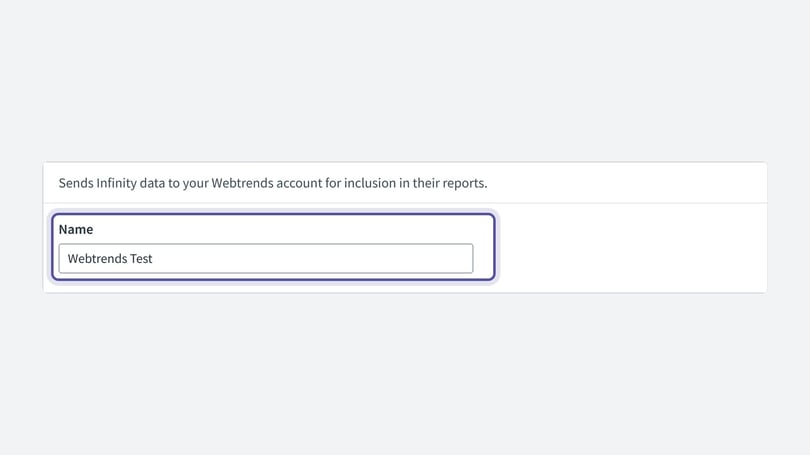
- Select Webtrends from the Integration Type drop-down. The page content changes to suit your integration type. Give your integration a name so you can remember it later.
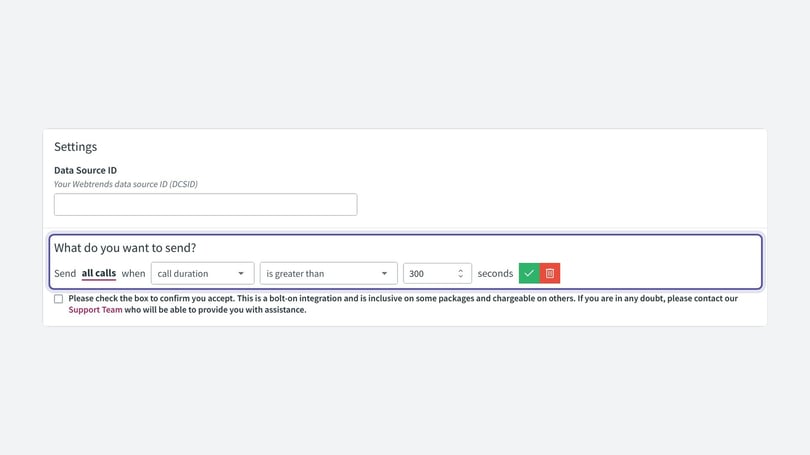
- In the Data Source ID field, paste the DCSID of your Webtrends space.
- Decide what triggers this integration to send its data. This can be based on calls, certain types of calls or call behaviour, or parts of the visitor journey. For example, you may want to send only calls that lasted longer than a certain duration, or calls that met particular goals along the way. When an event that meets the criteria occurs, Infinity sends the associated data to your Webtrends account and allocates it to the DCSID you specified. Use the What do you want to send? controls to define these rules.
- Click Save for the new integration. You are redirected to the list of previously created integrations, where your new integration is automatically enabled.
Need more help?
If you have any questions, contact a member of the Infinity support team, or email support@infinity.co.