In short
- An IVR (interactive voice response) is the automated voice menu callers hear when they call a business, and only an Infinity-hosted IVR makes IVR call tracking possible.
- An Infinity IVR lets you set up goals on the options callers select and separates IVR duration from call duration in the Infinity Platform, so time-based goals are more accurate.
- The nuisance call IVR plays a "Press 1 to continue" message, and callers who do not press 1 after three plays are disconnected, marked as potential spam and not charged for.
- You can set the nuisance caller IVR to None, All Callers or Anonymous Callers in Advanced Options under Settings > Setup > Settings > Telephony Settings > Tracking Pools Editor > Edit Config.
An IVR (interactive voice response) is the automated voice menu callers hear when they call your business. An Infinity-hosted IVR lets you track IVR routes and durations with IVR call tracking, and blocks nuisance calls before they reach an operator.
What is an IVR?
An IVR is the automated voice recording that callers are presented with when they call your business. It asks callers to select an option. Depending on the option they press, their call is routed to a specific department or area of your business.
An IVR helps you distribute calls and streamline your operations. An Infinity IVR also lets you set up Infinity goals that trigger on the options callers select, and gives full detail on call duration and IVR duration in the Infinity Platform. That is what makes IVR call tracking possible: you can't capture it with an IVR that isn't hosted by Infinity.
The benefits of IVR call tracking with Infinity
If you're considering an Infinity IVR, define your requirements and we'll put together an IVR call tracking setup that suits your business. These are the main benefits:
- IVR routes can be goaled for reporting. For example, 60% of callers are existing customers and 40% are new customers, based on the routes they choose.
- Time-based goals are far more accurate with an IVR, because we can tell the IVR duration apart from the call duration. This isn't possible with an externally hosted IVR.
- Campaign decisions can be made from this reporting. For example: which times of day to increase PPC spend, and which marketing channels and keywords drive each IVR route, so budgets go to the best-performing campaigns.
- Identified spam calls are voided from top-line statistics in marketing reports, which improves data accuracy.
- IVR data can be sent to third-party platforms to enrich other reports, such as GA4 and Google Ads.
- Identified spam calls don't reach operators, which frees up phone lines and reduces operator tasks.
- Identified spam calls aren't charged for.
- The call transfers more smoothly, rather than the caller hearing the ring tone change.
Nuisance call IVR
The nuisance call IVR blocks spam calls from robo-diallers. It plays an audio message to callers before the call connects, which says "Press 1 to continue".
When a caller presses 1, the call connects as usual, usually to the welcome message or the IVR. If a caller doesn't press 1 after the message has played three times, the call is disconnected and marked as potential spam. That call is excluded from top-line statistics, and you aren't charged for it.
There are two versions of the audio file: a UK voice and a US voice. The UK version plays by default. If the number being dialled has a US destination, the US audio file is used instead.
Check a tracking pool's nuisance caller IVR setting
You can see the current nuisance caller IVR mode in the list of tracking pools. Go to Settings > Setup > Settings, then click Tracking Pools Editor in the Telephony Settings tab. The status of the nuisance caller IVR is shown at the bottom of the page. In the example, it's disabled, set to None.
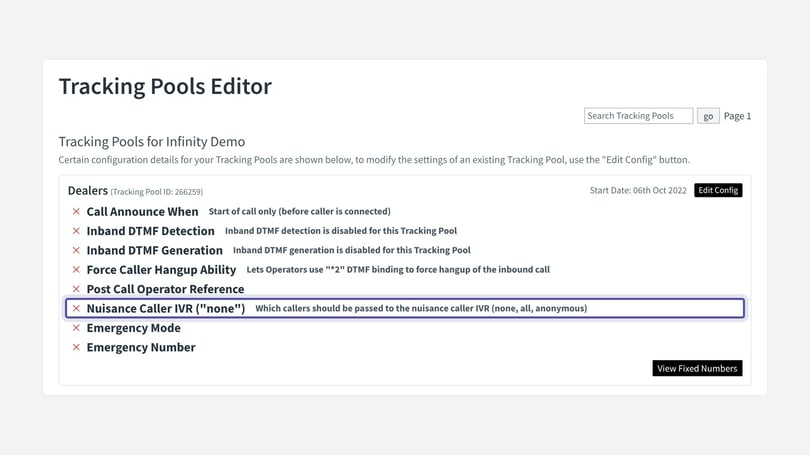
Enable a nuisance caller IVR
- Go to Settings and select Settings from the Setup menu.
- Select Telephony Settings.
- Select Tracking Pools Editor.
- Search or scroll for your tracking pool, if you have more than one.
- Select Edit Config.
- Scroll down to the Advanced Options section at the bottom of the page.
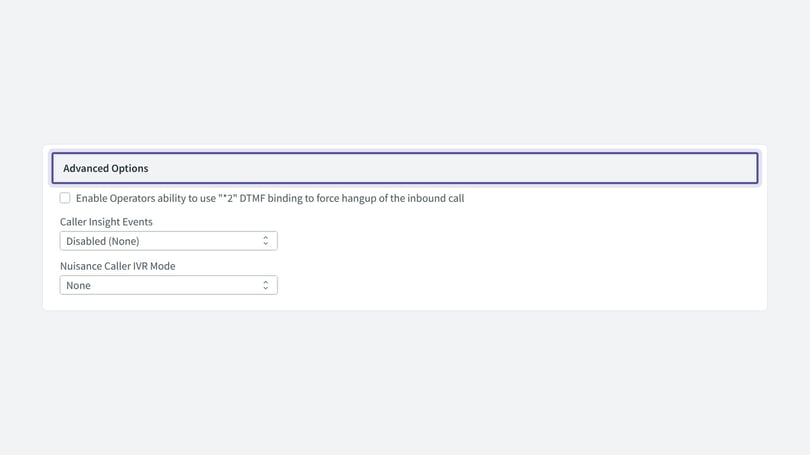
Choose whether to enable the feature for all calls, or only for callers with an anonymous caller ID, from the drop-down menu.
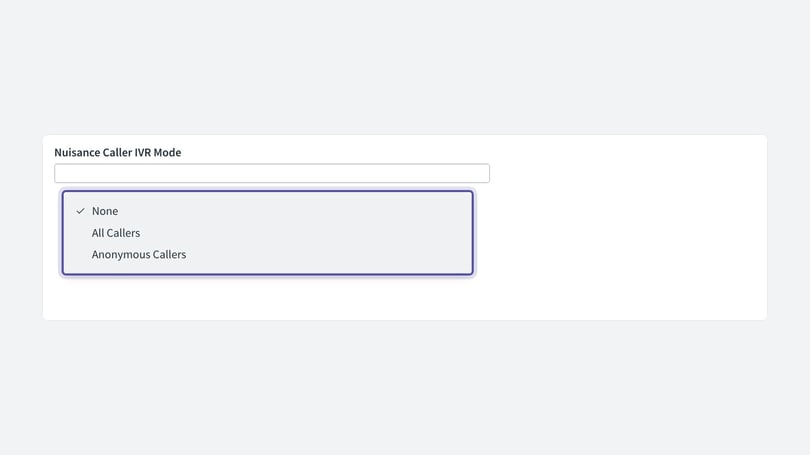
The options work as follows:
- None disables the nuisance caller IVR, so it isn't played to any caller.
- All Callers enables the nuisance caller IVR for all callers.
- Anonymous Callers enables it only for callers who withhold their number.
When you've made your changes, select Save Changes. Repeat for any other tracking pools.
Use a custom soundfile
You can use a custom soundfile, so the message matches your other messages. Create a soundfile and share it with the Infinity support team, who can apply it for you. The soundfile must say the same as Infinity's default file, which is "Press 1 to continue".
Recording requirements:
- Audio channels: mono
- Sample rate: 8kHz
- Bits per sample: 16
- Maximum file size: 1MB
Need more help?
Check out our article on how to block nuisance calls. For more information on Infinity IVRs, contact support@infinity.co or your Customer Success Manager.