In short
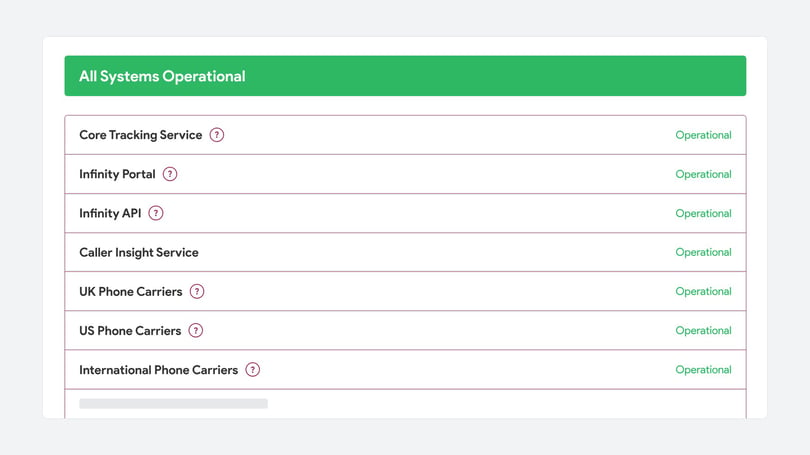
- Infinity service status is published at infinitystatus.com, which shows the status and uptime of each Infinity Platform component, plus incidents, maintenance and when they were resolved.
- To get Infinity incident alerts, click Subscribe To Updates on infinitystatus.com and subscribe by email or, using the phone icon, by SMS.
- After subscribing to Infinity status updates you can choose which components to hear about, and change preferences or unsubscribe from the link in any notification email.
You can check Infinity service status at any time on infinitystatus.com, including service announcements for maintenance or unexpected downtime. The page shows the status and uptime of each part of the Infinity Platform, and any incidents and when they were resolved. This guide covers what the status page shows and how to subscribe to email or SMS notifications.
Get email notifications
If you'd like an email whenever a new incident is raised or resolved, go to infinitystatus.com. In the top right-hand corner, click Subscribe To Updates.
Then enter your email address and select Subscribe Via Email.
After you subscribe, you'll receive an email confirming your subscription, with the option to manage your subscription preferences. Or you can continue to the next page and select which components you want to receive notifications for.
Finally, select Update Preferences. To unsubscribe or manage your preferences later, click the subscription management page link in any notification email.
Get SMS notifications
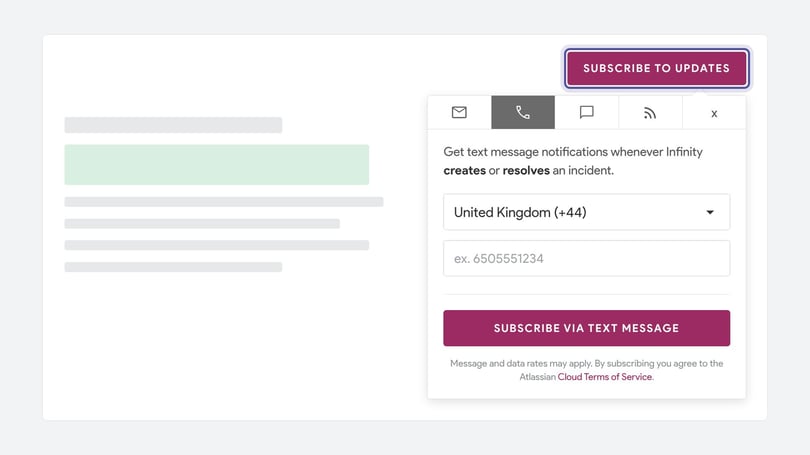
If you'd rather receive notifications by SMS than by email, click Subscribe To Updates in the top right of infinitystatus.com. Then select the phone icon in the sub-menu.
Select your country code, enter your preferred phone number and select Subscribe via text message. Shortly afterwards, you'll receive a confirmation SMS.
You can also go on to the next page to choose which components you'd like SMS notifications for, in the same way as for email notifications.
Need more help?
If the status page shows everything is working but you're having problems with calls, see Why are my calls failing?, Block nuisance calls and International coverage and number quarantining. If you're still stuck, get in touch with your account team or email support@infinity.co.