This guide lists the call log export fields you can download from the Infinity Platform, and explains what each one contains. Use it to decide which call log export fields to include when you export your calls to CSV, and to understand the values in your file. The guide covers how to export from the Calls Log first, then describes each field group in turn.
How to export your call data
You can export call data directly from the Calls Log. Export all of your calls, or choose which call log export fields you want in your CSV file first.
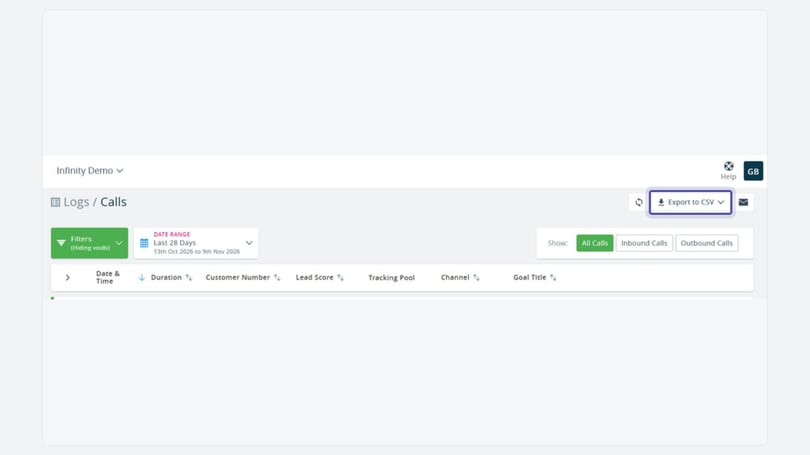
- Navigate to the Calls Log.
- You should see Export to CSV at the top right of the log.
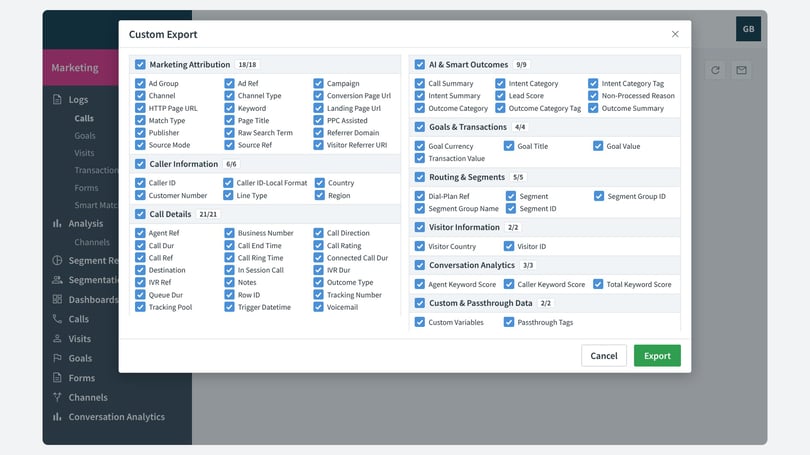
- You can either export All calls or select Custom Export to decide which fields you wish to export to your CSV report.
Call log export fields by group
The tables below explain the call log export fields available in Infinity exports. The groups match the ones in the Custom Export list, so you can see which call log export fields belong together.
Marketing attribution fields
These call log export fields show where a call came from, including the channel, campaign and page the visitor was on.
| Field | Description |
|---|---|
| Ad Group | Network group name, configured by the customer. |
| Ad Ref | Advert or creative ID. |
| Campaign | Network campaign name, configured by the customer. |
| Channel | The last clicked channel or last 'source' that the visitor came to the website via. You can select multiple channels to view in the Calls Log. |
| Channel Type | Channels grouped to a higher level. Custom Channels will be set with a Channel Type of 'cust'. |
| Conversion Page URL | The page the customer was viewing when making the call. This will only appear if the call is placed within 30 minutes of actively viewing the page. |
| HTTP Page URL | The last page that the customer viewed, with no time limit associated. |
| Keyword | Google Ads or Microsoft Ads keyword (if PPC), utm_term or configured for fixed number. |
| Landing Page URL | The URL of the page the user first landed on for this visit. |
| Match Type | The PPC match type: either broad (b), phrase (p), exact (e) or content display (d). |
| Page Title | The title of the page that the user was on when they made a phone call. |
| PPC Assisted | Shows '1' if the user's Visitor Trace contains a land from a Paid Search channel. This can be at any point in the journey, not just based on recent lands. |
| Publisher | The advert publisher, which can be configured by the customer when setting up fixed numbers, for example 'Brochure' or 'Office Numbers'. |
| Raw Search Term | Legacy field, used to identify the search term for SEO searches. |
| Referrer Domain | The domain of the website that the user visited prior to landing on a website and subsequently making a call. |
| Source Mode | Source identifier of the channel (fixed, direct, seo, ppc, etc). |
| Source Ref | Raw source reference for Infinity. |
| Visitor Referrer URI | The URI of the website or page that directly linked to the page the user dialled from. |
Caller information fields
These call log export fields describe the person who made the call, such as their number and where they are calling from.
| Field | Description |
|---|---|
| Caller ID | The telephone number of the person making the phone call, in E164 format. This can be visible or redacted based on the account set up. |
| Caller ID-Local Format | The telephone number of the person making the phone call in local format. This can be visible or redacted based on the account set up. |
| Country | The country that the call is being made from, based on the ID format. |
| Customer Number | The telephone number of the person making the phone call, in E164 format. This can be visible or redacted based on the account set up. |
| Line Type | Line type of the caller (mobile or fixed line). This will be blank if the number is withheld. FIXED_LINE = geo; MOBILE = mobile; FIXED_LINE_OR_MOBILE = US (and unable to tell number type from number); TOLL_FREE = toll-free; UAN = national. |
| Region | Region of the caller, based on the caller's area code. |
Call details fields
These call log export fields record how each call was handled, including its timings, the number dialled and any notes.
| Field | Description |
|---|---|
| Agent Ref | The name or reference of the answering agent. This can be assigned via API or via Smart Match. |
| Business Number | The phone number where Infinity has routed the call to, usually the business's main phone number. |
| Call Direction | The direction of the call, either in or out. |
| Call Dur | Captures the entire duration in seconds. This includes IVR duration, queue duration and Connect call duration if we host your IVR. |
| Call End Time | Date and time that the phone call was closed. |
| Call Rating | The rating assigned to the call, either manually or via Post Call Rating. |
| Call Ref | The unique sequential call reference assigned to the call. |
| Call Ring Time | How long, in seconds, the call rang before being answered by a human or an IVR. |
| Connected Call Dur | The duration, in seconds, that a call was connected. This is usually the duration minus the ring time. |
| Destination | The phone number where Infinity has routed the call to, usually the business's main phone number. |
| In Session Call | Flags if the call was made while the user was active on the website. |
| IVR Dur | How long the caller was in the IVR (requires Infinity to host the IVR). |
| IVR Ref | The reference of the IVR leg the caller moved through (requires Infinity to host the IVR). |
| Notes | The note that has been attached to the call. You can add notes in the Infinity Platform. |
| Outcome Type | Outcome Type ('N'ormal, 'C'onversion or 'V'oid). |
| Queue Dur | How long, in seconds, the caller was in a queue before the call was answered. |
| Row ID | A unique, non-sequential ID for the call. |
| Tracking Number | The Infinity Tracking Number that the caller dialled. |
| Tracking Pool | The name of the Tracking Pool that the dialled Tracking Number belongs to. |
| Trigger Datetime | The date and time of the phone call. |
| Voicemail | A flag to show whether or not the call was sent to a voicemail box (optional feature). |
AI and Smart Outcomes fields
These call log export fields show the AI-generated summary, intent and outcome for each call, where Smart Outcomes has processed it.
| Field | Description |
|---|---|
| Call Summary | The AI-generated summary of the phone call. |
| Intent Category | The intent category that has been triggered based on the generated intent. |
| Intent Category Tag | The high-level intent of the triggered category, for example Sales Lead or Service Enquiry. |
| Intent Summary | The AI-generated intent, generated from the call summary. |
| Lead Score | A numerical score assigned to the call, based on page views and events predating the call. |
| Non-Processed Reason | The reason or error that caused the call not to be processed through Smart Outcomes. |
| Outcome Category | The outcome category that has been triggered based on the generated outcome. |
| Outcome Category Tag | The high-level outcome of the triggered category, for example Sales or Other. |
| Outcome Summary | The AI-generated outcome, generated from the call summary. |
Goals and transactions fields
These call log export fields show any goal or transaction triggered by the call.
| Field | Description |
|---|---|
| Goal Currency | Currency assigned to the goal that has been triggered for this call. |
| Goal Title | Name of the goal that has been triggered for this call. |
| Goal Value | Value that has been assigned to the goal that has been triggered for this call. |
| Transaction Value | Value of the transaction assigned to the call. This will usually be '0'. |
Routing and segments fields
These call log export fields show how the call was routed and which segment it matched.
| Field | Description |
|---|---|
| Dial-Plan Ref | If a customer uses a dial plan, this is the ref associated with the option selected, for example 'support-US' or 'sales: open'. |
| Segment | The name of the segment triggered for the call. |
| Segment Group ID | The ID of the segment group triggered for the call. |
| Segment Group Name | The name of the segment group triggered for the call. |
| Segment ID | The ID of the segment triggered for the call. |
Visitor information fields
These fields describe the visitor who made the call.
| Field | Description |
|---|---|
| Visitor Country | The country of the visitor, derived from the visitor's IP address. |
| Visitor ID | The UUID string (vid) of the visitor. |
Conversation Analytics fields
These call log export fields show the keyword scores identified in the conversation.
| Field | Description |
|---|---|
| Agent Keyword Score | The summed score of the agent-level keywords identified from the call. |
| Caller Keyword Score | The summed score of the caller-level keywords identified from the call. |
| Total Keyword Score | The summed total of the agent and caller keyword scores. |
Custom and passthrough data fields
These call log export fields carry any custom variables and tags that you have set up on your website.
| Field | Description |
|---|---|
| Customer Variables | Custom variables configured in the website JS, stored in a JSON-formatted string. |
| Passthrough Tags | Passthrough tags that have been assigned from URL parameters, stored in a JSON-formatted string. |
Need more help?
To see each call's details, see The Calls Log. If you're still stuck, get in touch with your account team or email support@infinity.co.