In short
- The Infinity call tracking JavaScript library gives developers public events, methods and configuration options for the latest Infinity tracking script, which must be deployed first.
- The Infinity JavaScript library fires four events, InfinityLoaded, InfinityReady, InfinityTracked and InfinityAllocated, and all its methods are called through the global _its variable.
- Infinity JavaScript library methods include init, track, findAndReplaceNumbers, trigger, autoPopulateInput, setVariable, getVariable, getAllocatedNumbers, getVisitorId, tagExternalLinks and setStorage.
- The Infinity init config storage option defaults to localStorage, cookie then sessionStorage, and a memory option used with setStorage holds visitor data until cookie consent is given.
- Single page applications need the Infinity spa plugin, which tracks page views automatically when observeChanges is on, or in manual mode where track is called after each page view.
- To find an Infinity visitor ID, open the browser Developer Tools Console and run window._its('getVisitorId'), which returns the unique ID for that visitor.
The Infinity call tracking JavaScript library gives developers the public events, methods and configuration options for Infinity's tracking script. This guide covers all of them, from the events the script fires and the options for init to single page applications, tracked sites and finding a visitor ID, so you can work with how Infinity allocates and replaces numbers on your website. It applies only to the latest Infinity JavaScript, so deploy that first if you haven't already.
How the library works
The Infinity call tracking JavaScript library runs on your pages and gives you two things to work with. The first is a set of events that fire as the script loads and runs. The second is a set of methods that you call through the global _its variable. Methods let you call the script's features directly, such as reading the visitor ID, sending a custom trigger or setting a custom variable.
Before you start
This guide only applies to users of the latest Infinity JavaScript. If you haven't deployed the call tracking JavaScript library yet, follow Install the Infinity JavaScript code first.
Events in the call tracking JavaScript library
The call tracking JavaScript library triggers a number of events during execution, which you can hook into.
| Name | Description |
|---|---|
| InfinityLoaded | Fired when the script has been loaded. |
| InfinityReady | Fired when the script has been initialised and loaded any necessary config. |
| InfinityTracked | Fired whenever a page view is tracked. |
| InfinityAllocated | Fired whenever any numbers found in the page have been allocated a dynamic tracking number. |
For example:
window.addEventListener('InfinityLoaded', () => {
  console.log('Infinity has been loaded');
});
Call tracking JavaScript library methods
All methods can be called from the global _its variable. The general form is window._its('methodName', ...arguments);, where methodName is the method you want to call.
Any method can be called at any time after the Infinity code block, but return values are only provided once the script has loaded. For this reason, we recommend that you either wait for the InfinityLoaded event, or check whether the script has already loaded. For example:
if (window._its?.loaded) {
  window._its('getVisitorId').then((vid) => { console.log('Visitor ID:', vid); });
} else {
  window.addEventListener('InfinityReady', (e) => {
    window._its('getVisitorId').then((vid) => { console.log('Visitor ID:', vid); });
  });
}
The code examples in this guide show example values in place of the parameters you need to define in each method call. Do not copy any of the code examples that contain parameters into your site without modifying and understanding what they do.
init
Initialises the call tracking JavaScript library and loads the config needed to perform tracking and number allocation.
| Name | Type | Description | Optional |
|---|---|---|---|
| Installation ID | string | This is the unique ID given to your Installation within the Infinity Platform. | No |
| Config | object | See the accepted config options below. | Yes |
Config options
| Name | Type | Default | Description |
|---|---|---|---|
| visibleOnly | boolean | false | When true, numbers will only be allocated and replaced when the element is visible on the page. |
| classless | boolean | true | When true, will find and replace any numbers exactly as they appear within the page. When false, will look at the exact contents of any elements matching the provided selector, and replace the entire contents if a matching number is found. |
| selector | string|undefined | undefined (when classless === true), or '.InfinityNumber' (when classless === false) | Accepts any valid DOM selector. This can be used to narrow the scope of where we look for phone numbers. All text and links under the matching elements will be examined. |
| ignore | string|undefined | undefined | Accepts any valid DOM selector. This can be used to specify elements to be ignored when looking for phone numbers. All content, including descendants, will be excluded from number replacement. |
| observeChanges | boolean | true | Whether number replacement should react to any changes to the DOM. When true, any elements added or changed will be evaluated and any new phone numbers will be replaced. If this setting is disabled, you must call findAndReplaceNumbers whenever the DOM is updated. |
| match | RegExp | (programmatically generated) | Regular expression used to identify content in the page that looks like a phone number. This can be overridden if your numbers contain unusual lengths or characters other than spaces, dashes and brackets. |
| minLength | number | 8 | Minimum length of number to search for. This setting has no effect if the match value is changed. |
| maxLength | number | 13 | Maximum length of number to search for. This setting has no effect if the match value is changed. |
| autoFormat | boolean | false | When enabled, will attempt to automatically format tracking numbers to match the format of the number they are replacing. This overrides the number format configured within your tracking pools. |
| storage | string[] | ['localStorage', 'cookie', 'sessionStorage'] | Specifies the storage methods that are allowed to be used to store visitor tracking data. This list is ordered by priority. Each method is attempted in the order of the array, to allow falling back for browsers that block certain storage methods. Valid entries are: 'localStorage', 'cookie', 'sessionStorage' and 'memory'. We recommend using localStorage where possible for best performance. The memory option stores data only in memory. It can be used in conjunction with the setStorage method to persist data to storage only after obtaining user consent via a cookie management tool. However, use of this option can lead to fragmented visitor traces if the visitor moves to different pages on the site without persisting to storage. |
| storageExpiry | number | 315360000 (10 years) | How long to retain stored visitor data in the browser, in seconds. |
| plugins | object | {} | Plugins can be configured here to add extra functionality to the Infinity tracking code. Currently the only supported plugin is 'spa', which adds support for Single Page Applications. See the Single page applications section below for detailed usage information. |
| trackedSites | Object | {} | Configuration for how to handle tracked sites. See the Tracked sites configuration section below for usage information. |
Example usage
window._its('init', '1234', { visibleOnly: true });track
Tracks a page view.
| Name | Type | Description | Optional |
|---|---|---|---|
| delay | number | How long (in ms) to wait before tracking (default 1000). This is provided for cases where you need to obtain custom variables from third-party code which might be loaded after Infinity. | Yes |
Example usage
window._its('track', 3000);Return values: Promise<void>
findAndReplaceNumbers
Searches for and replaces numbers in the page. For most use cases, this method does not need to be called manually.
Example usage
window._its('findAndReplaceNumbers');trigger
Sends a custom trigger.
| Name | Type | Description | Optional |
|---|---|---|---|
| action | string | The name of the action to trigger. | No |
| details | object | An object containing trigger properties to record with the custom trigger (commonly used is 't', for title). | Yes |
Example usage
window._its('trigger', 'DOWNLOAD', { t: 'Brochure' });autoPopulateInput
Fills in an input with the Infinity visitor ID. This can be called at any time. If the visitor ID is not yet available, the call is queued until the script has been initialised.
| Name | Type | Description | Optional |
|---|---|---|---|
| selector | string | DOM selector pointing to the element(s) to be populated. If no elements match, or if they are not input elements, this method will not do anything. | No |
Example usage
window._its('autoPopulateInput', '#infinity_vid, input[name="infinity_vid"]');Return values: Promise<void>
setVariable
Sets a custom variable.
| Name | Type | Description | Optional |
|---|---|---|---|
| name | string | The name of the custom variable. | No |
| volume | string|object | When provided as a string, this value will be set as the variable's value. When provided as an object, this gives the option to automatically capture either a global variable or a cookie by name (see the examples below). Global variables can be accessed using dot notation to capture data nested within objects. | No |
| scope | string | Allows you to control when variables should be persisted and updated. Valid values are: 'page' (default), where the variable only applies to the current page; 'land', where the variable is persisted until the next land and will only be updated if the page is considered a land; and 'visit', where the variable is persisted until the next land and will only be updated if the variable has not already been set for this visit. | No |
Example usage
window._its('setVariable', 'myVariable', 'value');
window._its('setVariable', 'myCookie', { type: 'cookie', key: 'myCookieName' });
window._its('setVariable', 'myGlobalVariable', { type: 'global', key: 'my.global.variable' });
getVariable
Retrieves a custom variable's value.
Example usage
window._its('getVariable', 'myVariable');Return values: string|null
getAllocatedNumbers
Retrieves a list of the tracking numbers allocated on the current page. Results are keyed on the auto-discovery number detected in the page.
Example usage
window._its('getAllocatedNumbers');Return values: { [identifier: string]: { dynamicNumber: string, e164Number: string }}
getVisitorId
Retrieves the current visitor ID. This method returns a promise, which resolves once the visitor ID is available.
Example usage
window._its('getVisitorId').then((vid) => { console.log('Visitor ID:', vid); });Return values: Promise<string>
tagExternalLinks
Adds Infinity tagging parameters to external URLs. This is normally handled automatically, unless Auto Tag External Destinations is disabled in your tracked sites config.
| Name | Type | Description | Optional |
|---|---|---|---|
| selector | string | DOM selector for the link(s) to be tagged. If no elements match, or if they are not links, this method will not do anything. | No |
| ignore domain checks | boolean (default false) | By default, this method only appends links which are to external domains which match the tracked sites config. When set to true, these checks will be skipped and the tagging applied to all elements. | Yes |
Example usage
_its('tagExternalLinks', '.internalLink', true);setStorage
Changes which storage mechanism is used to persist visitor tracking data. This method can be used in combination with the storage config option to initially store data only in memory, and then persist to local storage or cookies once the visitor has accepted a cookie prompt.
| Name | Type | Description | Optional |
|---|---|---|---|
| storages | string[] | List of storage methods to apply. See the storage config option for the list of accepted values. | No |
| expiry | number | How long to retain stored visitor data in the browser, in seconds. | Yes |
Example usage
_its('setStorage', ['localStorage', 'cookie']);Single page applications
Single page applications (SPAs) behave differently from a standard website, because they can change the URL and contents of the page without the browser loading a new page. Infinity supports automatically tracking page views and changes to your page content without any modifications to your website code. If your website, or part of it, is handled by an SPA, we recommend that you add the SPA plugin to the call tracking JavaScript library to make sure all visitor data is captured.
Automatic SPA handling requires the observeChanges setting to be enabled, which it is by default. For compatibility with more complex apps, or where the URL isn't always updated on page views, there is an alternative manual mode. In this mode, you must call track manually after each page view.
Standard usage
window._its('init', '1234', { plugins: { spa: {} } });Manual tracking of page views
window._its('init', '1234', { plugins: { spa: { mode: 'manual' } } });
// when a page view occurs
window._its('track');
Tracked sites configuration
The call tracking JavaScript library supports multiple methods of tracking visitors across different domains without using third-party cookies. The standard approach is to apply query parameters to any links which match your tracked sites config.
Tracking via cookies on the top-level domain
If your site spans multiple subdomains on the same top-level domain, you can instead configure the tracking script to store an additional cookie on that domain. This cookie is shared across all subdomains. For example:
window._its('init', '1234', {
  trackedSites: {
    cookieDomain: '.example.com'
  }
});
Iframe tracking
NOTE: This method does not work with Apple Safari, due to additional restrictions within this browser. We recommend using multiple tagging methods if you need to support Safari users.
To enable iframe tracking between subdomains, add a standard HTML page to each subdomain. This page sets the local storage (visitor information) for that subdomain. The page only needs to call the script infinitytagger.js from the Infinity domain. For example:
// This page is called infinityTagger.html, will need to be referenced in the call to
// the tracking script
<!DOCTYPE HTML PUBLIC>
<HTML>
<body>
</body>
<script src="https://script.infinity-tracking.com/infinitytagger.js">;
</script>
</HTML>
The trackedSites config should then include the domains you want to try tagging via iframe, and the path to the HTML file created above on each of those domains. For example:
window._its('init', '1234', {
  trackedSites: {
    domains: {
      'www.example.com': { iframePath: 'infinityTagger.html' },
      'store.example.com': { iframePath: 'infinityTagger.html' },
    }
  }
});
Finding your Infinity visitor ID
The Infinity visitor ID is a unique identifier that the call tracking JavaScript library uses to identify a visitor on a website. It ties the visitor's session to any other visits they have made on your website.
Sometimes your visitor ID may be useful for our Support or Customer Success teams for troubleshooting purposes. If you require your Infinity visitor ID for any reason, follow these steps:
- On the relevant website, press F12, or right-click the screen and select Inspect to open the Developer Tools.
- Within the Developer Tools, select the Console tab.
- Paste in the following line of code. You may be warned about pasting data into the Console. Follow the steps it suggests.
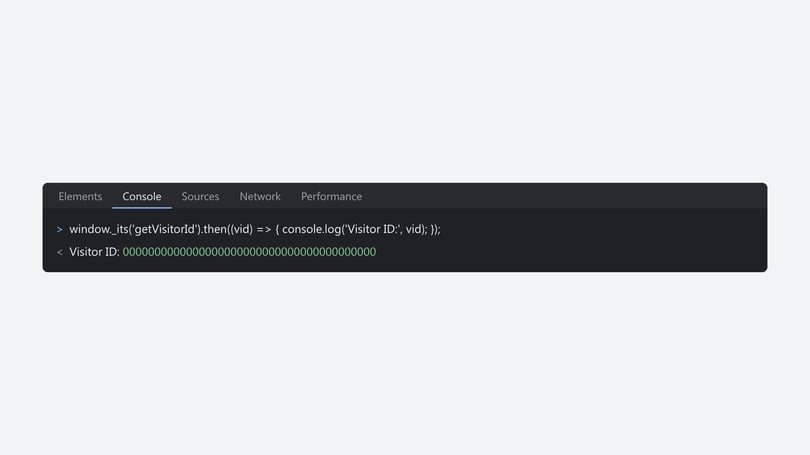
window._its('getVisitorId').then((vid) => { console.log('Visitor ID:', vid); });This returns your Infinity visitor ID. For example:
Need more help?
For how to deploy the latest Infinity JavaScript, which powers the call tracking JavaScript library, read Install the Infinity JavaScript code. If you're still stuck, get in touch with your account team or email support@infinity.co.